Install Annona
Annona ships as two things, and you can have either or both:
| What it is | Install | |
|---|---|---|
| The app | A window: ask the kernel things, watch it decide, read the ledger. Carries its own daemon — nothing else to install. | Download a build |
| The CLI | annona — the same kernel from a terminal, plus the daemon, the policy tools and the ledger checks. No window. |
pip install annona |
Both read the same ~/.annona/policy.yaml and write the same ledger. Installing
one does not stop the other from working.
Beta, and unsigned
The macOS and Windows builds are not signed by a recognised developer. Notarisation needs a paid Apple certificate this project does not yet use, and saying so here is better than letting you find out from a dialog. On macOS this has a concrete consequence and a concrete fix — see macOS, and read it before double-clicking anything.
The app
Builds for every platform are on the releases page.
| Platform | File |
|---|---|
| macOS, Apple Silicon (M-series) | Annona_<version>_aarch64.dmg |
| macOS, Intel | Annona_<version>_x64.dmg |
| Windows | Annona_<version>_x64-setup.exe |
| Linux | Annona_<version>_amd64.AppImage or annona_<version>_amd64.deb |
macOS
Because the app is unsigned, macOS quarantines it on download. On macOS 15 and later this is not a dialog you can click through: the system reports the app as damaged and moves it to the Trash, and the old right-click → Open escape route no longer exists.
So clear the quarantine flag on the disk image, before opening it:
Then open the .dmg and drag Annona to Applications as usual. The app has no
quarantine flag to inherit, and launches normally from then on.
That command removes the marker macOS puts on downloaded files. You are telling
your machine you trust this file — which is a real decision, so it is yours to
make rather than something an installer does quietly. If you would rather not:
pip install annona needs none of this, and building from source needs none of
it either.
More detail, including how to tell "unsigned" apart from "actually corrupt", is in Opening it on macOS.
Windows
Run the .exe. SmartScreen will warn that the publisher is unknown: More
info → Run anyway.
Linux
Or with the .deb:
The CLI
Python 3.10 or newer. This installs three console scripts — annona, and the
aliases dogana and akaion — plus the daemon and every policy and ledger
command.
The wheel does not contain the window. pip install annona gives you the
kernel, the CLI and the local API; the interface lives in the desktop bundles.
Starting the daemon from a pip install and opening http://127.0.0.1:7070 gets
you a 404, and that is expected rather than broken.
Optional extras, none of which are needed to run:
pip install 'annona[formats]'    # .pptx, .p7m, Outlook .msg, HEIC photos
pip install 'annona[providers]'  # SDKs for hosted models, if your policy names one
From source
make setup creates the virtual environment and installs everything, including
the development tools. make demo then runs a real agentic loop with real tool
execution, no credentials and no network — the fastest way to see what the
repository actually does.
First run
Annona needs a policy before it can answer anything. The policy is the document every decision derives from: which model runs what, what may leave this machine, which folders a tool may open. Without one the daemon starts, says it is not enforcing, and refuses to place anything.
You are asked for it once, in three questions. Both the app and the CLI ask the same three, from the same profiles.
In the app
The first launch opens the configurator instead of the app:
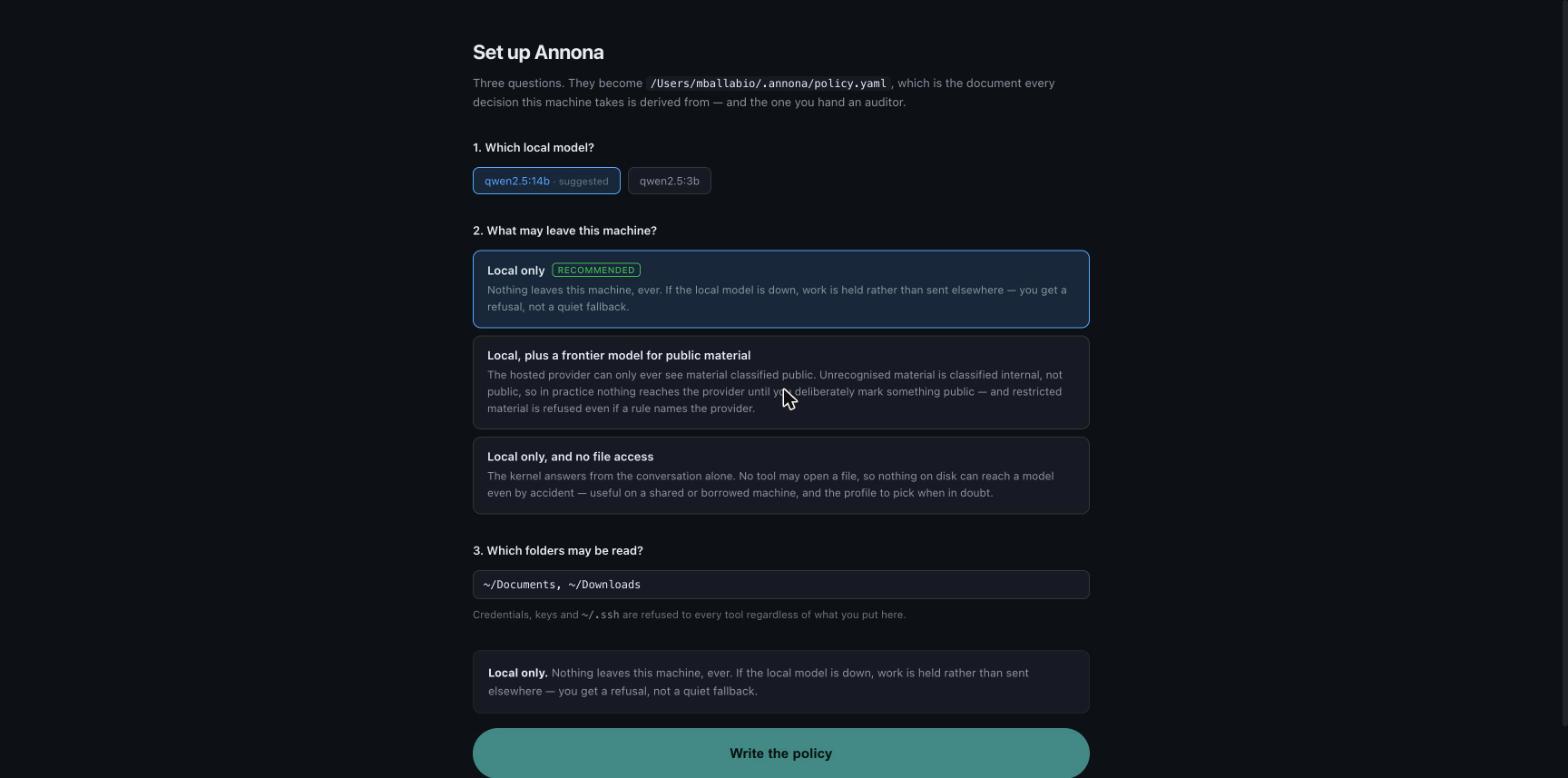
Each option says what it means rather than what it sets. "Local only" is the recommended answer and the one most installs should keep: nothing leaves the machine, and if the local model is down your work is held rather than quietly sent somewhere else.
Choosing the second profile asks which hosted provider, and where its key lives:
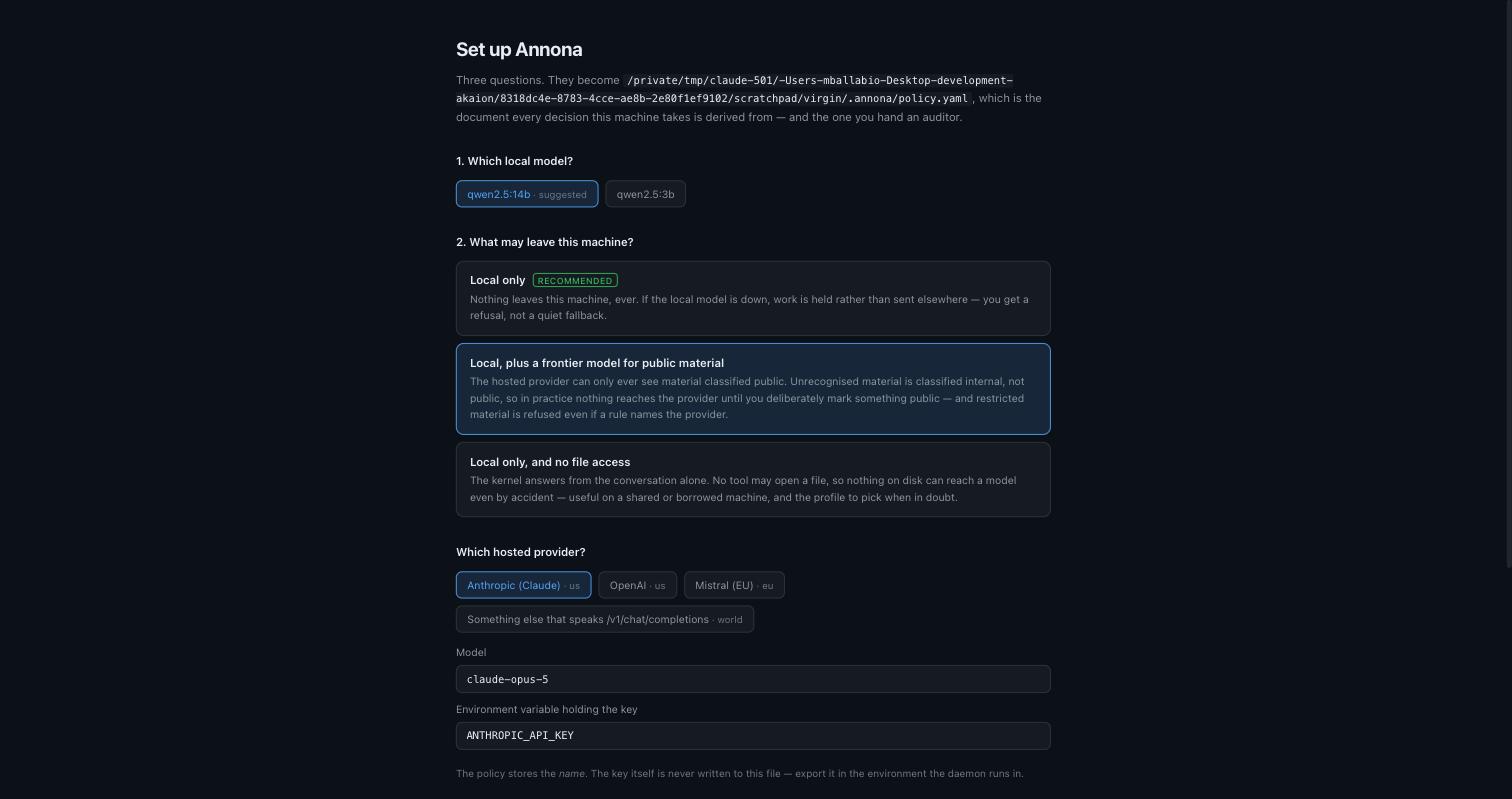
The policy stores the name of the environment variable, never the key. A policy file is the document you hand an auditor, and a key in it is a key in a git history.
In the terminal
$ annona setup

🛡️  Annona setup

  config    written /Users/you/.akaion/config.yaml

1. Which local model?

  1  qwen2.5:14b  ← suggested
  2  qwen2.5:3b

  Number [1]:

2. What may leave this machine?

  1  Local only  (recommended)
      Nothing leaves this machine, ever. If the local model is down, work is
      held rather than sent elsewhere — you get a refusal, not a quiet fallback.

  2  Local, plus a frontier model for public material
      The hosted provider can only ever see material classified public…

  3  Local only, and no file access
      The kernel answers from the conversation alone…
annona setup is safe to run twice: it never overwrites a policy that exists.
For scripts and containers there is nothing to answer —
— and it asks nothing when there is no terminal, so a provisioning run cannot hang on a prompt.
You need a local model
The default profiles run on Ollama. Install it, then pull a model — 14b if the machine can hold it, 3b if not:
Setup registers whichever model you already have rather than insisting on one, and tells you what to pull if you have none.
Check it works
$ annona doctor

 ✓   python              3.12.13
 ✓   config              /Users/you/.akaion/config.yaml
 ✓   policy              /Users/you/.annona/policy.yaml · 1 substrate(s), 3 rule(s)
 ✓   substrate local-gpu up at http://localhost:11434 · qwen2.5:14b · 2 model(s)
 ✓   ledger              0 entries · chain intact · 0 gaps
 ✓   daemon              127.0.0.1:7070 · responding

✅ Ready.
doctor changes nothing, contacts nothing except the substrates your policy
already names, and exits 1 if the installation cannot run a step — so it can be
the last line of a provisioning script.
It checks one thing the daemon's own liveness probe cannot: whether the model
your policy names is actually pulled. A runtime that is up with that model
missing looks perfectly healthy to a liveness check, places the step, and then
fails from the far side of a decision already written to the ledger as placed.
 ✗   substrate local-gpu up, but qwen2.5:14b is not pulled (has: qwen2.5:3b)

  substrate local-gpu: ollama pull qwen2.5:14b
Start it
The app starts its own daemon; you do not need this if you are using the window.
What it looks like working
Every answer carries where it ran and under which rule:
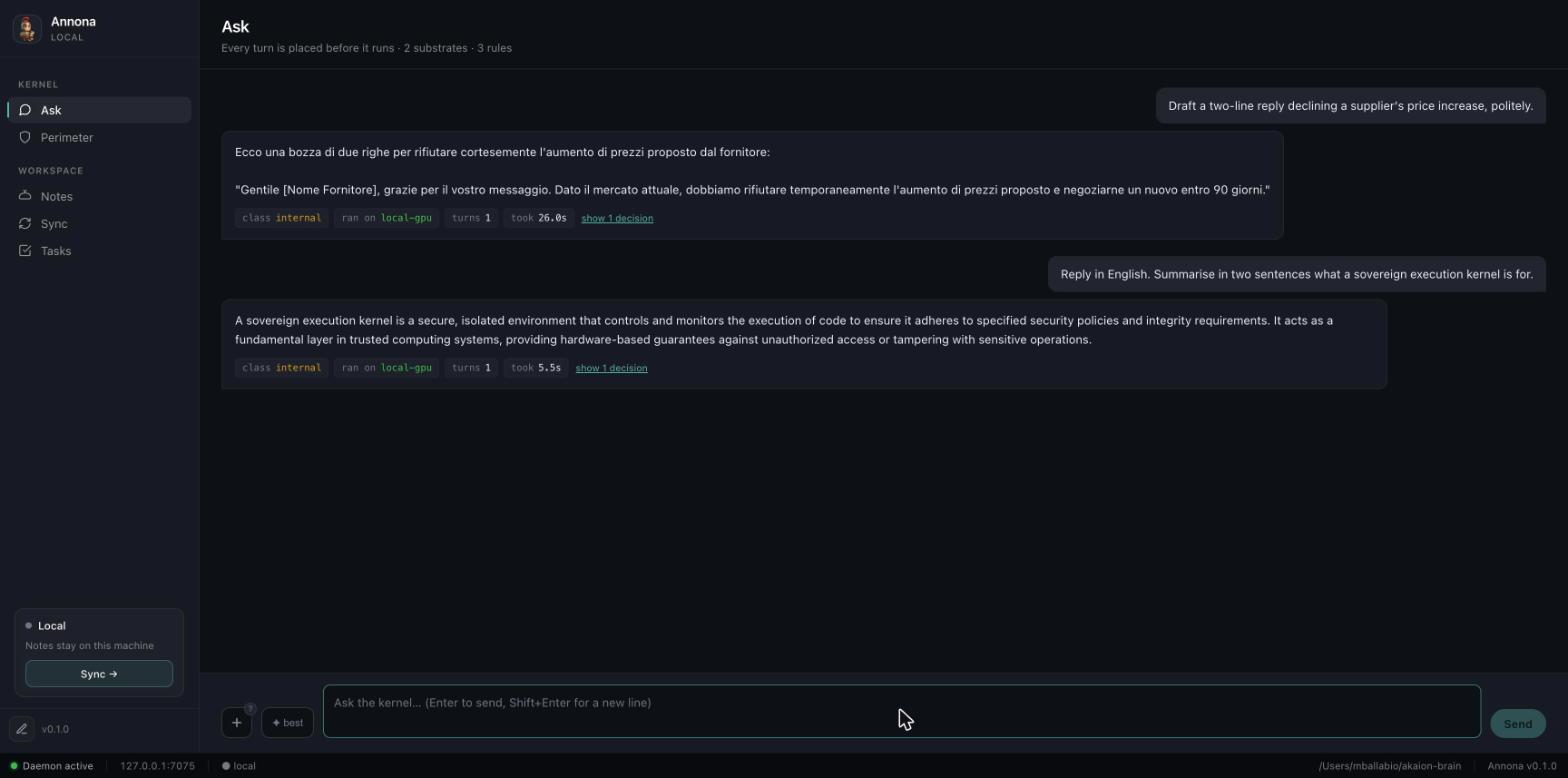
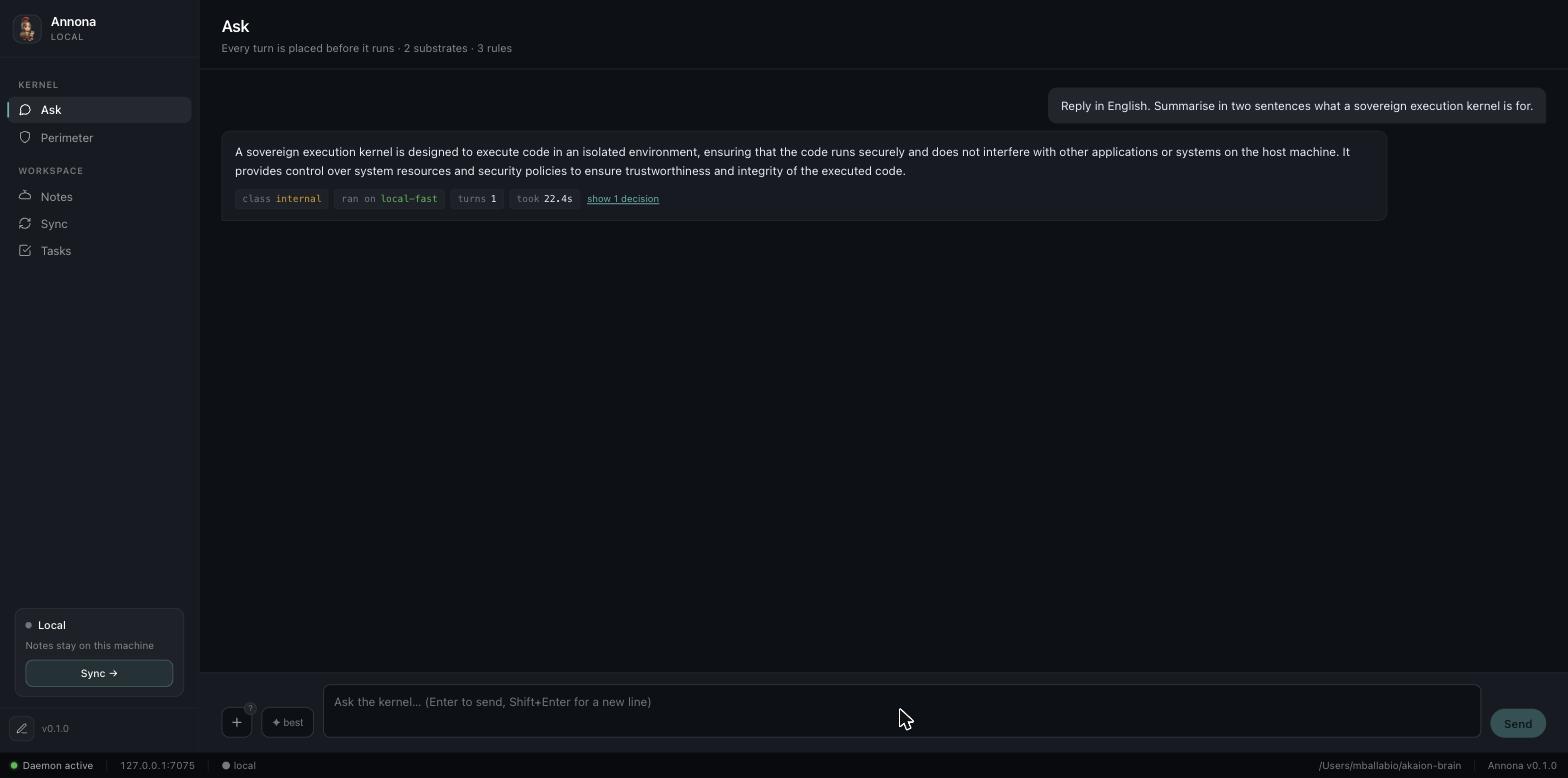
The same question under a policy that allows only the smaller model — same kernel, different placement, and the answer says so:
And when nothing the policy permits is available, the honest outcome:
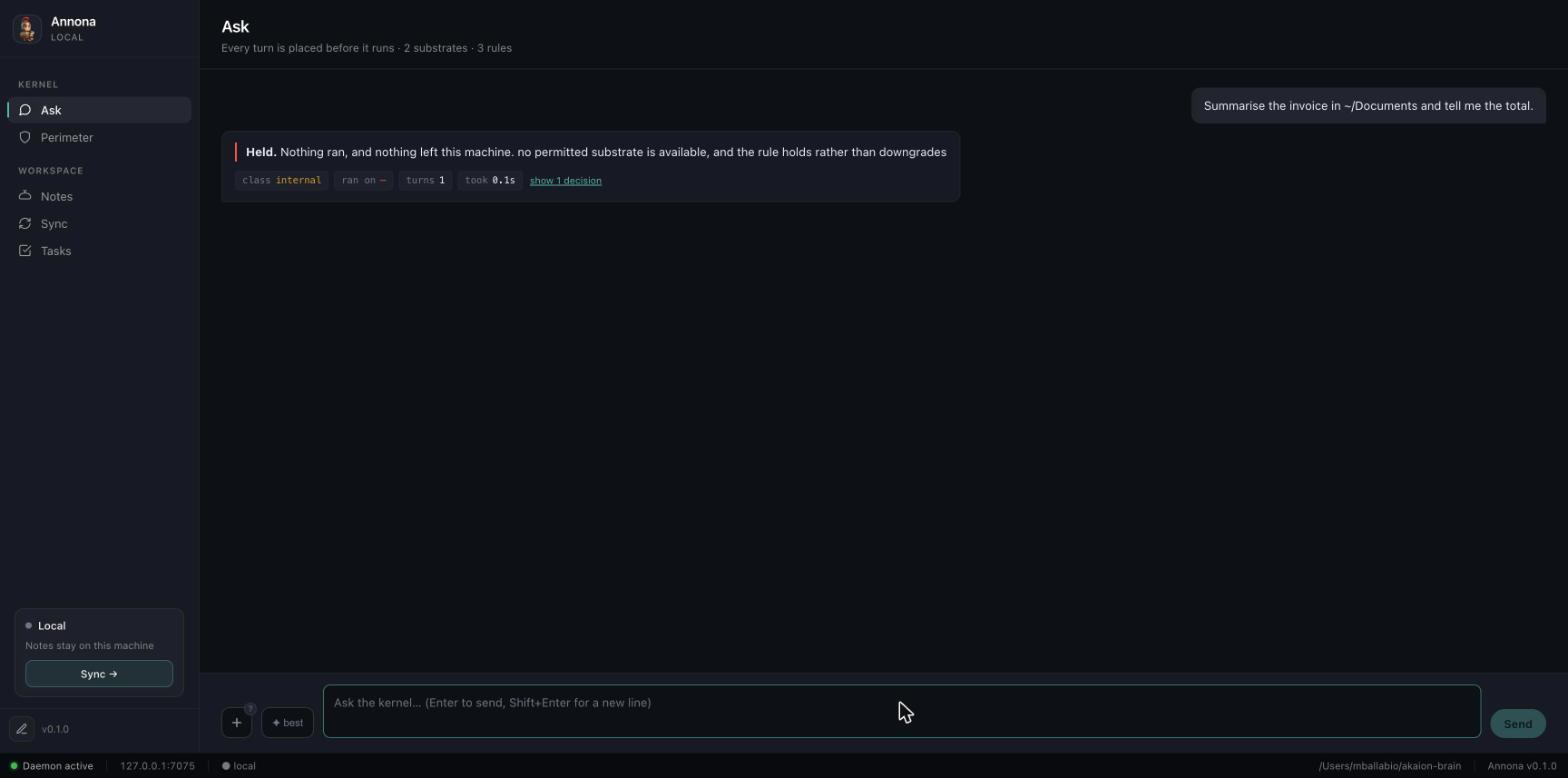
That is the behaviour to check on your own machine before trusting anything else: stop your local model, ask something, and confirm you get a refusal rather than an answer from somewhere you did not choose.
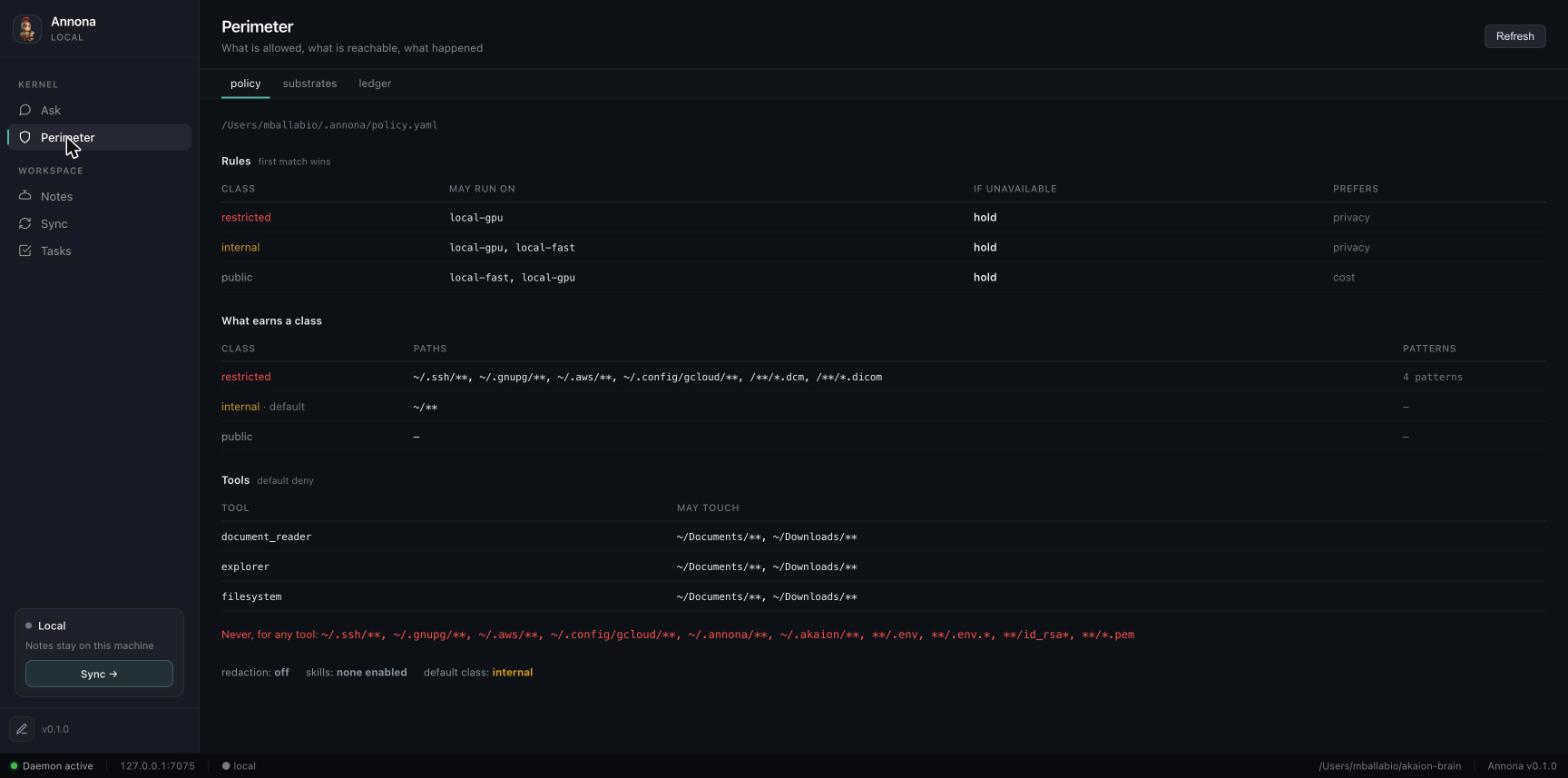
The Perimeter view shows what the policy allows, as the runtime reads it — not as it is written:
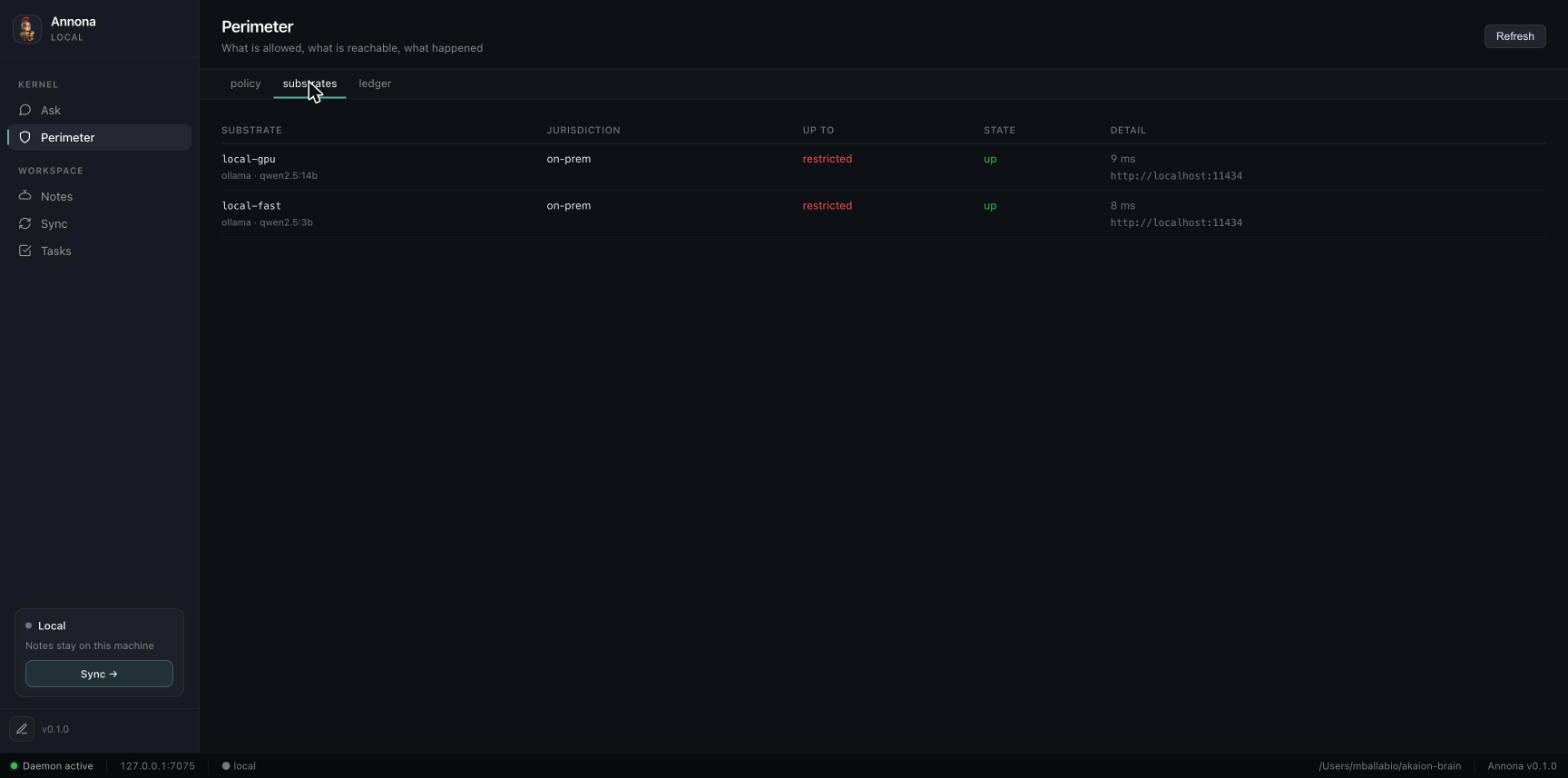
…which substrates are registered and whether they answer:
Uninstall
The app. Drag Annona.app to the Trash (macOS), uninstall from Settings
(Windows), or delete the AppImage / sudo dpkg -r annona (Linux).
The CLI. pip uninstall annona (or pipx uninstall annona).
A checkout installed with the old install.sh. That script, and the
uninstall.sh and install-remote.sh beside it, came from the project's
Akaion Runner days and were removed after 0.1.3: the uninstaller deleted every
line mentioning ~/.local/bin from .bashrc, .zshrc and config.fish,
including the ones uv, pipx and other tools rely on (#41). By hand:
It also appended export PATH="$HOME/.local/bin:$PATH" to your shell's rc
file. Leave it: other tools install there, and nothing in it is Annona's.
Your data. Neither of those touches it. The policy, the ledger and the vault are yours, and they stay:
~/.annona/policy.yaml     the policy
~/.annona/ledger.jsonl    every decision this machine took
~/.akaion/config.yaml     daemon settings
~/akaion-brain/           the vault, as plain markdown
Delete them yourself when you want them gone. The ledger in particular is the record of what was decided and refused; a program that removed it during an uninstall would be removing the evidence that it behaved.
Troubleshooting
annona: command not found after pip install — the scripts went somewhere
not on your PATH. python3 -m runner.cli --help works regardless (the
distribution is annona, the Python package inside it is runner), and
python3 -m site --user-base tells you which bin to add.
The window says the daemon is unreachable — run annona doctor. If it says
the daemon is not running, the app's own daemon failed to start; the log is at
~/.annona/logs/annona.log.
Opening 127.0.0.1:7070 gives a 404 — you are running the daemon from a
pip install, which does not carry the window. Expected; use the app bundle.
macOS moved the app to the Trash — the quarantine flag; see macOS above.