Turning the perimeter on
Five minutes, on the machine you already have. At the end, a run that reads a client file cannot be placed on a frontier API — and you will have watched it refuse.
Nothing here needs a GPU, a DGX, or an account.
1 · Write a policy
Or annona policy init --model qwen2.5:14b if you only want the policy and
already have a configuration.
That writes ~/.annona/policy.yaml and changes the daemon's behaviour in one
way that matters: from this point tools are default-deny.
A fresh install gets this without asking: the first annona run (or annona
cloud enable|disable) on a machine with no configuration writes the local-only
policy alongside the config. An installation that already had a configuration
and no policy keeps the legacy allow-by-default permission manager, so upgrading
does not silently break a working machine — but it is not silent either: every
annona run prints that it is unenforced, and annona status shows which of the
two wirings the machine is on. Writing a policy is the act that switches
enforcement on.
The shipped policy registers only your local runtime. Nothing can leave the machine because nothing outside it is declared.
annona policy show        # the policy as the runtime understands it
annona policy validate    # exit code 1 if it does not load
2 · Check what is up
| id | jurisdiction | max class | health |
|---|---|---|---|
| local-gpu | on-prem | restricted | up · 12 ms |
If it says down, start the model server (ollama serve) — or leave it down for
a minute, because that is the interesting case.
3 · Ask where work would go, before running any
This is the command to run before a change goes live rather than after an incident: it answers "if this were restricted, where would it go?" without needing restricted material to try it with.
With the local runtime down, the first one answers held and names every
substrate it did not choose, with the reason.
4 · Add somewhere else to go
Placement only becomes interesting when there is more than one option. Add a second substrate and a rule that allows it — deliberately, because this is the line where material can start leaving:
substrates:
  - id: local-gpu
    kind: ollama
    endpoint: http://localhost:11434
    model: qwen2.5:14b
    jurisdiction: on-prem
    max_class: restricted      # may see anything
    probe: true

  - id: frontier
    kind: anthropic
    jurisdiction: us
    max_class: public          # may see only what is public
    quality: 98

rules:
  - match: { class: restricted }
    allow: [local-gpu]
    on_unavailable: hold       # the whole point: no silent downgrade

  - match: { class: public }
    allow: [frontier, local-gpu]
    prefer: quality
on_unavailable says what happens when every substrate a rule allows is down:
| Value | What happens today |
|---|---|
hold |
The step does not run. Nothing leaves; the refusal is in the ledger. |
brief |
A local model writes a brief that may cross instead of the material, if egress.brief permits it for the class. |
redact |
A local redactor replaces identifiers and the result is reclassified before it may cross, if redaction is configured and permitted for the class. |
queue |
Behaves like hold. The ledger records queued, but nothing resumes the step when a substrate returns — run it again yourself. Automatic resumption is not built yet. |
Sealed material is never briefed or redacted: it is held whatever the rule says.
max_class is the field everything turns on. It is declared per substrate rather
than derived from jurisdiction, so you can be stricter than geography — an EU
cluster you do not control can be capped at public even though it is in the EU.
5 · Say what is sensitive
classes:
  restricted:
    paths:    ["/mnt/pratiche/**", "~/clienti/**"]
    patterns: ['[A-Z]{6}\d{2}[A-Z]\d{2}[A-Z]\d{3}[A-Z]']   # codice fiscale
  internal:
    paths:    ["~/Documents/**"]
  public:
    default: true
Paths are matched both literally and resolved, so a symlink out of a protected directory is classified by its target. Patterns are matched against content and against anything a prompt names — pasting a tax code into a question is enough.
6 · Watch it refuse
Nine checks in about twenty-five seconds. It plants a canary in a client file, lets a real local model read it, and asserts the things an auditor would:
  pass  reading a client file made the run restricted
  pass  no payload reached the frontier substrate
  pass  leak rate is zero
  pass  the ledger chain verifies
  pass  with the GPU down, restricted work is held (not rerouted)
7 · Read the record
Every decision — including every refusal — is in a hash-chained ledger you can check without contacting anyone.
annona audit              # placements, outcomes, classes
annona audit --held       # every refusal, with its reason
annona verify             # the chain, offline
annona why step_7f3a      # one decision, reconstructed
Changing it later
policy.yaml is a file you own, and editing it in your editor is still the most
direct way. The app can do it too — Perimeter → Edit:
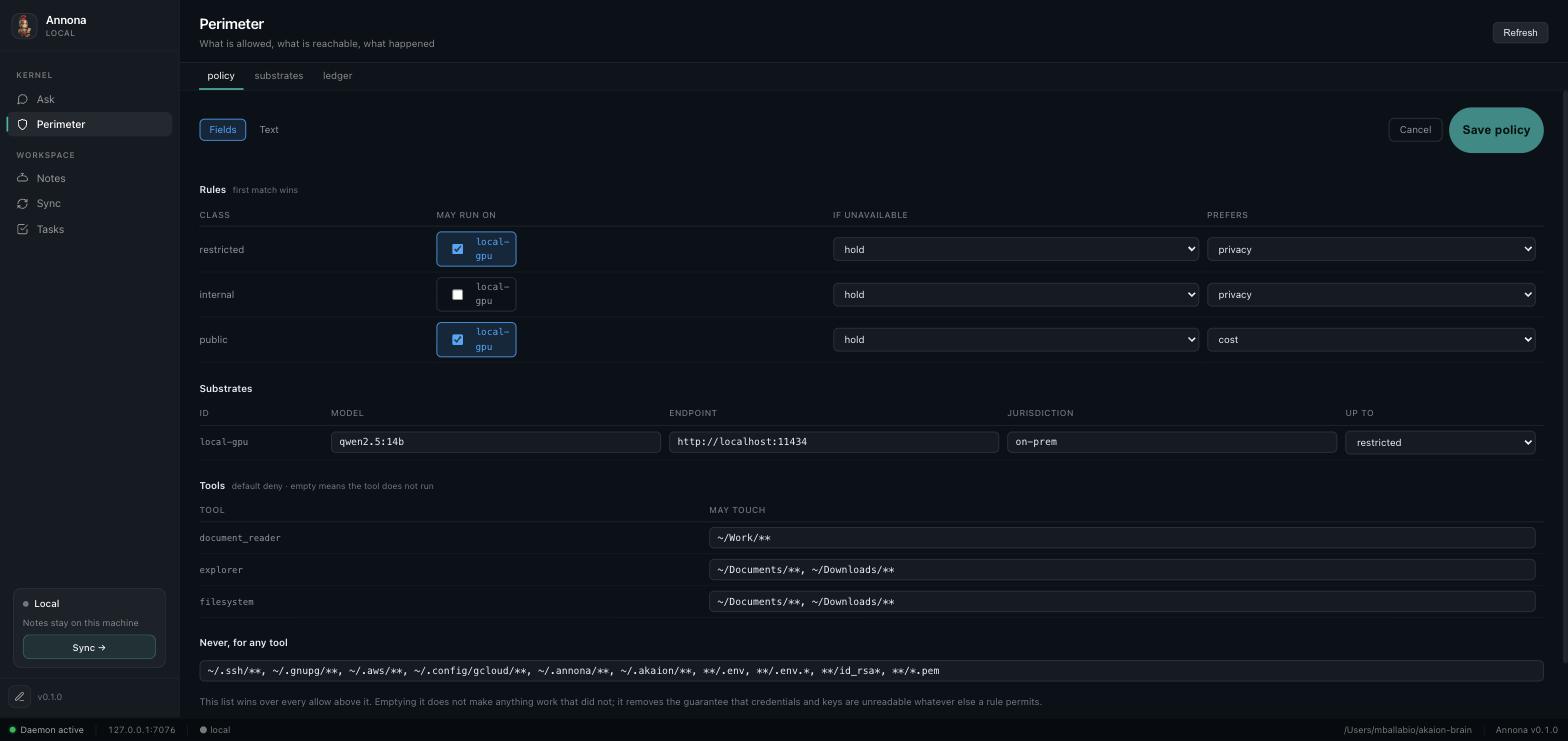
The fields cover what the tables show. Text mode edits the file itself, and is the only way to change something the fields do not cover — or to keep comments you wrote inside the body, which a structured save would rewrite away. The editor switches to it on its own when it finds such comments, rather than offering a save that deletes them.
Three things hold that up, and they are worth knowing because they are what make an editable perimeter defensible rather than merely convenient:
- Nothing invalid reaches disk. The replacement is parsed before it is written, by the same loader the daemon uses. A policy that does not load would stop enforcement, and this is the one failure the editor must not cause.
- Nothing is lost. The previous file is copied to
policy.yaml.bak-<n>beside it, every time. - Nothing is quiet. Every change is appended to the same hash-chained ledger as the decisions.
That last one is the point. A perimeter you can widen is only trustworthy if widening it is on the record next to what ran afterwards:
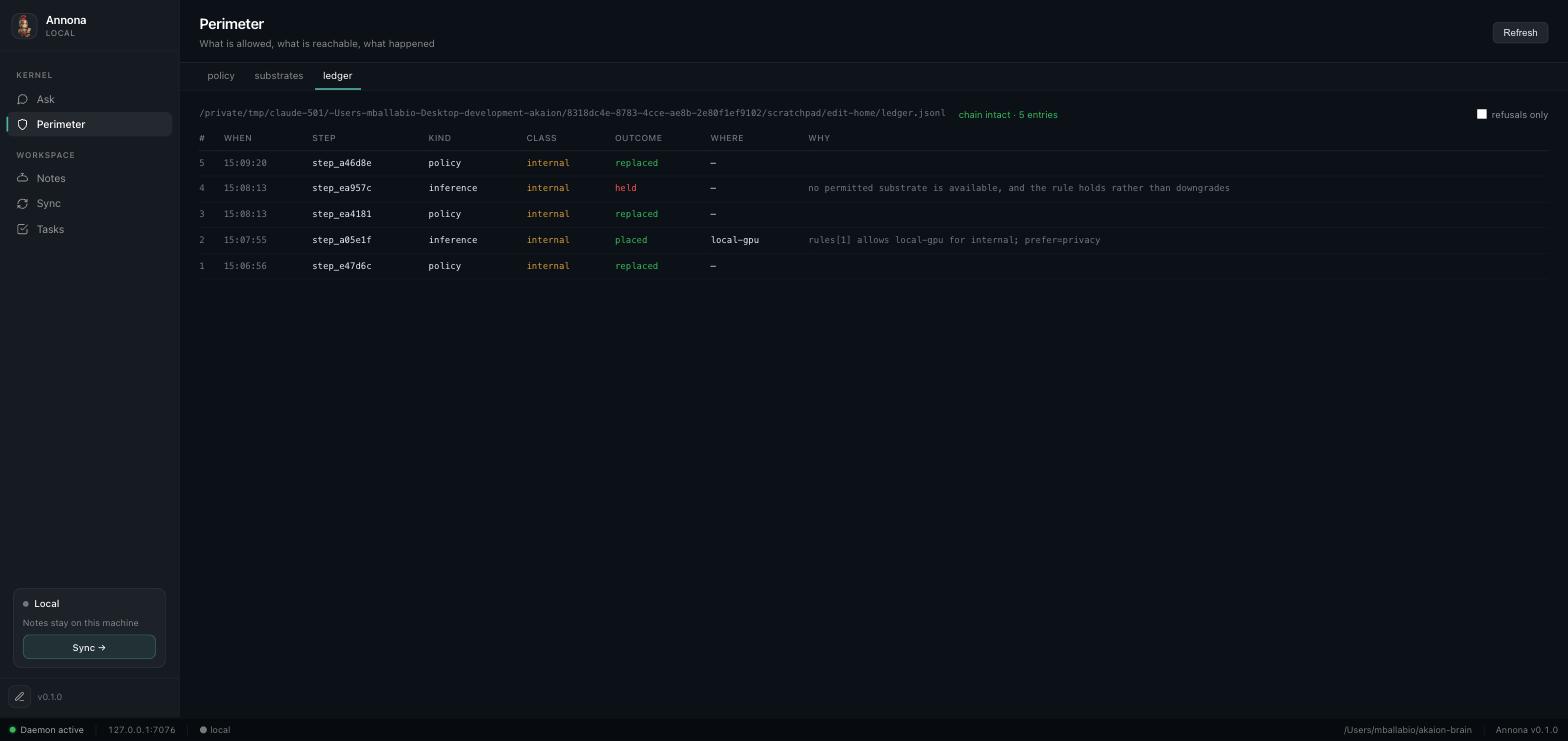
Read as: the perimeter was changed, something ran on the local GPU, the perimeter
was narrowed, the next run was held, and the perimeter was changed again.
Five entries, chain intact. annona audit shows the same from a terminal.
A change takes effect on the next run — the policy is read per run, so nothing needs restarting.
What to do next
- Turn on skills —
annona skills, then name the ones you want in the policy. See Skills. - Add redaction — a local PII model lets a restricted question be answered by a frontier model without the identifiers. See the README section on the Italian open-source stack.
- Put it in a container —
docker compose up -d, and on DGX-class hardware thevllmprofile. See Deploying.
Two things people hit
"My tools stopped working." They did: the policy is default-deny and only
names document_reader, explorer and filesystem for two directories. Add
what you need, with paths. shell and browser are deliberately absent —
a shell has no path argument, so allowing it is all-or-nothing, and a browser
reaches a network this policy cannot yet classify.
"Everything is held." Usually one of two things: no rule covers the class
(no rule means deny), or the only permitted substrate is down. annona why on
the step id says which, in words, with the candidates it considered.